Buy a resin 3D printer if your priority is small, highly detailed parts—miniatures, figurines, display models, and anything where crisp surfaces and fine detail decide whether the part is good. Buy a filament (FDM) printer if you want a tougher, larger, lower-mess first machine for household fixes, toys, school projects, cosplay, and general experimentation. Resin usually wins on detail; filament usually wins on toughness, size, convenience, and beginner-friendliness—a tradeoff that holds across Formlabs, UltiMaker, and Prusa guidance.
Quick answer: Want the best-looking small parts and miniatures? Get a resin printer. Want a practical, forgiving first printer for household parts, toys, and cosplay? Get a filament printer. The technology matters less than the part you're trying to make.
Choose the Printer That Matches Your Part's Failure Mode
Most comparison guides ask "which printer is better?" in the abstract and then list generic pros and cons. That's the wrong question. The better question is: what makes your part fail? Choose resin when the part fails if detail is lost. Choose filament when the part fails if it cracks, bends, gets hot, or needs to be big.
Run every project through four quick tests before you buy:
- Detail test — Does the part look wrong if texture is lost or layer lines show (faces, armor trim, jewelry, scale models)? If yes, lean resin.
- Load test — Will the part be squeezed, dropped, heated, clipped, or screwed into place? If yes, lean filament (or an engineering resin).
- Volume test — Is the part physically large, or do you need many of them? If yes, lean filament.
- Workflow test — Are you willing to handle gloves, solvent washing, curing, liquid-resin waste, and ventilation? If no, lean filament.
A part can pass more than one test in different directions. A high-detail medallion that also has to survive a drop is exactly the kind of case where you weigh "detail" against "durability" instead of trusting a one-line verdict. For the broader process picture beyond these two, see our full breakdown of FDM vs SLA vs SLS.
Resin vs Filament 3D Printer: Side-by-Side Comparison
| If your main goal is… | Better choice | Why |
|---|---|---|
| Tiny details, crisp edges, minimal visible layer lines | Resin | SLA/MSLA resolves finer detail and smoother surfaces than nozzle-based extrusion. Formlabs |
| Durable household parts, brackets, organizers, repairs | Filament | Thermoplastics like PETG are easy to use and skip resin cleanup. Prusa |
| Miniatures and figurines | Resin | The clearest resin use case. Formlabs |
| School projects and gift printing with minimal fuss | Filament | Simpler workflow, fewer chemical-handling demands. Formlabs |
| Large cosplay shells or big prototype bodies | Filament | Larger build volumes and friendlier economics for bulk. Formlabs |
| Small precise parts that must look professional | Resin | Tight tolerances, smooth finish, fine features. Formlabs |
| Tough small parts with some flex or impact | It depends | Standard resin is often brittle, but engineering resin can compete. UltiMaker |
| The lowest-mess first experience | Filament | No liquid resin, wash station, or post-cure step in the normal workflow. Formlabs |
A quick vocabulary check, because the words drive what you buy. A resin 3D printer is a vat-photopolymerization machine that cures liquid resin with light; most affordable models are MSLA/LCD variants of stereolithography, which is why "SLA printer" and "resin printer" are used interchangeably in shopping language. An FDM/FFF printer melts thermoplastic filament and deposits it through a nozzle, layer by layer, as Prusa defines it.
Is a Resin 3D Printer Better for Miniatures?
Usually, yes. Miniatures are the clearest resin win. Formlabs notes that FDM creates larger, more visible layer lines and is appropriate mainly where fine surface details matter less, while it presents SLA as the ideal tool for hyper-realistic miniatures and figurines. If painted facial features, armor trim, or cloth texture will make or break the model, resin is the safer recommendation.
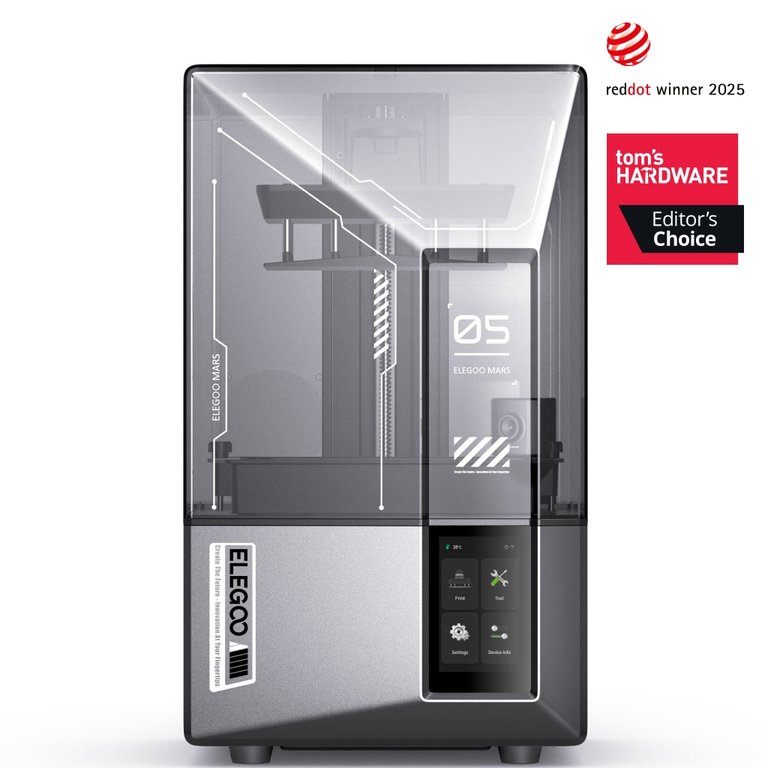
The specs explain why. Entry resin machines resolve extremely fine features: the ELEGOO Mars 5 Ultra lists an 18 µm XY resolution, and the Mars 5 offers 35 µm XY with layer thickness down to 0.01 mm. Formlabs reports standard SLA accuracy for tested features around ±0.15% to ±0.3%. That combination of fine XY detail and thin layers is what produces the smooth, print-line-free look tabletop and display models are judged on.
Can a filament printer make miniatures at all? Yes—but usually with visible compromises. FDM can produce playable minis, especially where fine detail is less critical, but it generally won't match resin for crisp surfaces and tiny features.
Which Is Stronger: Resin or Filament Parts?
Neither, in a blanket sense—and any guide that says "resin is stronger" or "filament is stronger" without qualification is oversimplifying. The honest version: standard resins are often more brittle than common FDM materials, but engineering resins can match or beat them for specific loads. UltiMaker frames it exactly this way—standard resins tend to be more brittle than filaments like PLA, while engineering resins can equal or exceed some common FDM materials.
The datasheets make the split concrete:
| Material | Category | Tensile / yield strength | Elongation at break | Heat deflection (HDT) |
|---|---|---|---|---|
| Formlabs General Purpose Resin | Standard resin | 65 MPa | ~6% | — |
| Formlabs Tough 2000 V2 | Engineering resin | ABS-like | ~79% (post-cured) | 70 °C @ 0.45 MPa |
| Prusament PLA | Standard filament | 51–59 MPa yield | — | 55 °C |
| Prusament PETG | Functional filament | 47–50 MPa yield | — | 68 °C |
Read the elongation column first. Standard resin's ~6% elongation is why it can feel glass-like and snap; engineering resin like Tough 2000 V2, at ~79% elongation after post-cure and a 70 °C HDT, behaves far more like ABS. On the filament side, PLA is strong but softens early (55 °C HDT), which is why PETG—tougher and more heat-resistant at 68 °C—is often the better pick for functional filament materials that live in a hot car, a garage, or a mechanical assembly.
So the practical rule is about matching material to load, not technology to a slogan:
- A drawer handle, hook, clip, bracket, or replacement cap is usually a filament case. Prusa describes PETG as tough with good thermal resistance and well suited to mechanical parts.
- A cosplay helmet or large prop body is usually filament territory—bigger build volumes, friendlier economics for large shapes—with resin reserved for high-detail inserts like faces and medallions.
- A small snap-fit enclosure or precise jig is where nuance matters most: standard resin isn't the default answer, but an engineering resin like Tough 2000 may be, which is a different (and pricier) buying discussion than an entry miniature printer running cheap standard resin.
One more reason resin can hit its rated numbers: isotropy. Formlabs and UltiMaker note that FDM parts are anisotropic—weaker across layer lines because layers are mechanically stacked—while SLA parts bond chemically between layers and behave more isotropically. Print orientation matters a lot more on a filament printer.
Which Is Easier for Beginners? Workflow and Cleanup Compared
Filament, in most cases—the workflow is the real beginner dividing line. FDM printing is essentially: slice, print, remove supports, and optionally sand. Resin printing adds steps: after the print you rinse the part in IPA or a similar solvent, dry it, and then usually post-cure it. Formlabs explicitly states that post-curing lets SLA parts reach their highest strength and stability (though over-curing can add brittleness).
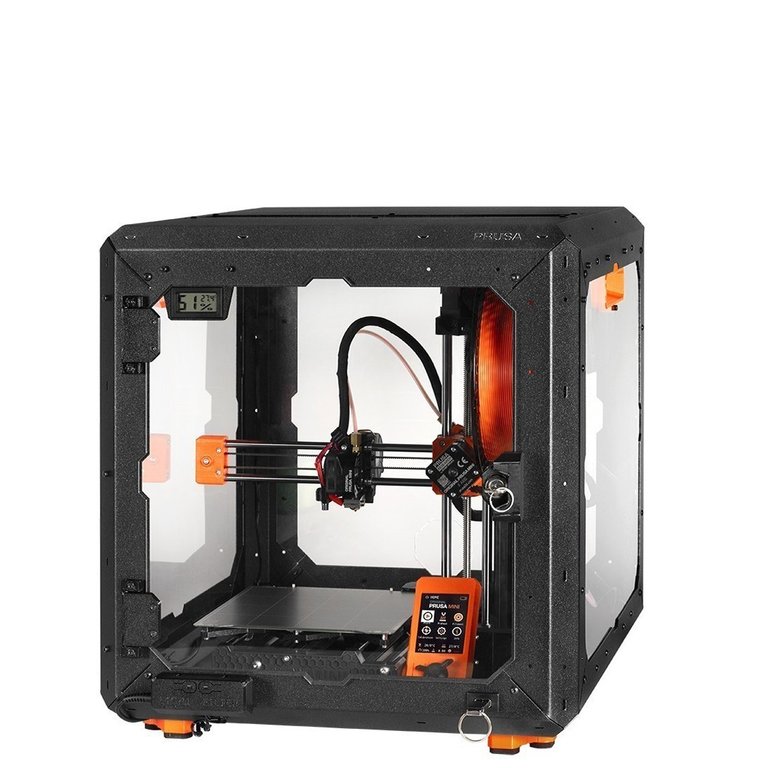
That extra handling is the daily reality of resin ownership: gloves on, solvent nearby, a wash-and-cure step, and liquid-resin waste to manage. A filament machine like the Original Prusa MINI+—a 180 × 180 × 180 mm build volume with a large, forgiving material ecosystem—lets a beginner go from sliced file to finished part without any of it. If you're still deciding on your very first machine, our guide to the best 3D printers for beginners covers the friction points that actually matter on day one.
Resin isn't automatically slower to print, though. Modern MSLA printers expose an entire layer at once, so they can be fast for batches of small parts—but total time still includes washing and curing. FDM is often simpler for a single large, rough part. Speed claims are usually product-specific, so don't treat "resin is faster" or "resin is slower" as a universal truth.
Is Resin Printing Safe at Home?
Resin needs more care than filament, but "resin dangerous, filament safe" is too simple. Both have a risk profile; they're just different.
Uncured resin is the real hazard to respect. Formlabs' Grey Pro Safety Data Sheet warns of skin irritation, allergic skin reaction, respiratory irritation, and aquatic hazard. DermNet notes that acrylate monomers are strong irritants and sensitizers, while fully polymerized (cured) acrylates are relatively inert. That's why Prusa recommends gloves, eye protection, easy-to-clean surfaces, cleanup discipline, and ventilation whenever you handle liquid resin.
Filament isn't emission-free, either. The U.S. EPA reports that FDM/FFF processes emit ultrafine particles and VOCs, with most particles in the ultrafine range and emissions varying heavily by material and temperature—ABS tends to be worse than PLA. Interestingly, a UL Chemical Insights chamber study found the opposite balance for resin: vat photopolymerization produced very limited particle emissions but VOC emissions roughly 3–6× higher than the FFF average (all still under the ANSI/CAN/UL 2904 TVOC limit in that test).
The takeaway for a bedroom or classroom: ventilate either way, choose your material with emissions in mind, and add gloves plus resin-specific cleanup discipline if you go resin. And don't assume smoother resin surfaces mean food-safe—Prusa is explicit that uncured resin and contamination make food contact a no unless you're using a certified system.
What Extra Equipment and Software Does a Resin Printer Need?
Beyond the printer, resin adds a wash-and-cure workflow (IPA or water for water-washable resins, plus a curing step) and often a dedicated wash/cure station. It also changes your software. A resin slicer still slices a model into layers like a filament slicer, but it leans much harder on resin-specific prep: orientation, tree supports, hollowing, and drainage holes. CHITUBOX defines itself as software that converts 3D meshes into printable files; Prusa's SLA tools add tree supports and hollowing; and Formlabs PreForm emphasizes one-click orientation and support generation.
Hollowing is where the resin workflow pays off—and why it's not optional busywork. In Prusa's own example, hollowing a model dropped resin use from 237 ml to 81 ml and estimated resin cost from $13.75 to $4.70. If you hollow, you generally need drainage holes so uncured resin doesn't stay trapped inside the print. Filament slicers have their own settings, of course, but they don't require this hollow-and-drain thinking for everyday parts.
A Scoring Model to Settle the Trade-off
Here's an editorial scoring synthesis of everything above, so you can see the trade at a glance. Scores are 1–5 (higher is better).
| Dimension | Resin | Filament |
|---|---|---|
| Fine detail & smooth finish | 5/5 | 3/5 |
| Beginner convenience | 2/5 | 4/5 |
| Home-workspace friendliness | 2/5 | 4/5 |
| Large-part capability | 2/5 | 4/5 |
| Everyday functional durability | 2–4/5* | 4/5 |
*Resin's functional score depends entirely on the resin: ~2/5 for cheap, brittle standard resin, up to ~4/5 for an engineering resin like Tough 2000. Read the pattern rather than the totals: resin dominates one column—detail—and filament leads everywhere convenience, size, and everyday robustness matter. That's the whole decision in five rows.
Frequently Asked Questions
Is a resin 3D printer better than a filament printer?
Only if your priority is small, highly detailed, smooth-finished parts. For general home use, functional parts, and easier first-time ownership, filament is usually the better default.
Is resin better for miniatures?
Usually yes. Resin reproduces fine details and surface textures with far fewer visible layer lines, which makes it the strongest fit for miniatures and figurines.
Are resin prints stronger than filament prints?
Not in a blanket sense. Standard resins are often more brittle, while engineering resins can be much tougher. The answer depends on the specific material, whether it's post-cured, and the type of load the part must survive.
Do resin prints need extra post-processing?
Yes, usually. Desktop resin parts normally need washing to remove uncured surface resin, and many materials also require or benefit from post-curing to reach final strength and stability.
What does a resin slicer do that a filament slicer does not?
A resin slicer still slices the model into layers, but it emphasizes orientation, tree supports, hollowing, drainage holes, and resin-specific exposure profiles—prep steps a filament slicer doesn't need.
Is PETG a better beginner functional material than PLA?
For many practical parts, yes. Prusa describes PETG as tough with good thermal resistance and suited to mechanical parts, while PLA has lower heat resistance (a 55 °C HDT versus PETG's 68 °C).
Is uncured resin hazardous to touch?
It can be. Resin safety data sheets and medical references warn of skin irritation and allergic skin reactions, and DermNet notes that acrylate monomers are strong irritants and sensitizers. Wear gloves and avoid skin contact with liquid resin.
Do I have to hollow resin prints?
Not always, but it's often recommended for larger models because it saves material and can reduce peel forces. If you hollow, you usually need drainage holes so uncured resin doesn't stay trapped inside.
Is filament printing completely safe indoors?
No. EPA and UL-related research show FDM/FFF can emit ultrafine particles and VOCs, so ventilation and material choice still matter—especially with higher-emission materials like ABS.