If you mostly produce 2D drawings, permit sets, layouts, and DWG-based documentation, AutoCAD is usually the better choice; if you mostly build parametric 3D parts, assemblies, product prototypes, and manufacturing-ready models, SOLIDWORKS is usually the better choice. Both are professional CAD platforms, but they are architected around different jobs, so the right pick depends on what you need to produce — not on which tool is "more powerful."
That split is backed by each vendor's own positioning. Autodesk describes AutoCAD as a CAD application for design, drafting, detailing, and visualization across construction, civil engineering, manufacturing, and plant design, while SOLIDWORKS centers its product on 3D parts, assemblies, drawings tied to the model, cloud revision management, simulation, and CAM-oriented workflows.
SOLIDWORKS vs AutoCAD at a Glance
| AutoCAD | SOLIDWORKS | |
|---|---|---|
| Core strength | 2D drafting, DWG documentation, visualization | Parametric 3D parts, assemblies, manufacturing docs |
| Modeling approach | Drafting-centric (2D, with 3D support) | Feature-based parametric 3D |
| Operating systems | Windows and macOS | Windows-only desktop |
| Web & mobile access | Included with subscription | Main desktop product no; xDesign variants yes |
| Specialized add-ons | 7 toolsets (Architecture, Electrical, MEP, Map 3D, Mechanical, Plant 3D, Raster Design) | Simulation, CAM, cloud revision management in higher tiers |
| Commercial price (US) | Monthly / annual / 3-year; $2,095/yr or $260/mo | From $2,820/yr (Standard) |
| Hobbyist path | AutoCAD LT (2D), 15-day trial | SOLIDWORKS for Makers, $48/yr |
| Best for | AEC, drafting, DWG documentation | Mechanical / product design, manufacturing |
The Output-First CAD Choice Matrix
Most comparisons collapse this decision into "AutoCAD is 2D, SOLIDWORKS is 3D." That's directionally true but incomplete: AutoCAD supports 3D, and SOLIDWORKS produces 2D drawings. A more reliable way to choose is to score each tool against the deliverable you actually need.
The matrix below scores both tools from 1 to 5 on the factors that decide the job. The scores are an editorial synthesis of each vendor's documented capabilities and packaging, not a lab benchmark.
| Criterion | AutoCAD | SOLIDWORKS | Best fit |
|---|---|---|---|
| 2D drafting and annotation | 5 | 3 | AutoCAD |
| Parametric 3D parts | 3 | 5 | SOLIDWORKS |
| Multi-part assemblies | 2–3 | 5 | SOLIDWORKS |
| Mechanical / product design workflows | 3 | 5 | SOLIDWORKS |
| AEC / layout / permit-style drawings | 5 | 2 | AutoCAD |
| Windows/macOS flexibility | 5 | 2 (desktop) | AutoCAD |
| Browser/mobile access included | 5 | 2 (main desktop) | AutoCAD |
| Maker / hobbyist entry path | 2–3 | 4 (via Makers) | SOLIDWORKS Makers |
| Student access | 4 | 5 | Depends on device |
| Public pricing clarity | 3 | 4 | SOLIDWORKS |
Read it by row: find the deliverable that dominates your work, and let that row point you to a tool. If your work spans several rows, weight the one you spend the most hours on. For a wider field of options beyond these two, see our roundup of the best CAD software.
SOLIDWORKS vs AutoCAD for Mechanical Engineering and Product Design
For parametric parts, assemblies, and manufacturing-ready documentation, SOLIDWORKS is the stronger fit. It is built around feature-based parametric modeling, where dimensions and constraints drive the geometry so that changes propagate through the model, plus assemblies with mating conditions, production drawings that stay associated with the 3D model, and cloud-aware revision management. Higher-end packages add motion and linear static analysis for teams that need simulation close to the design.
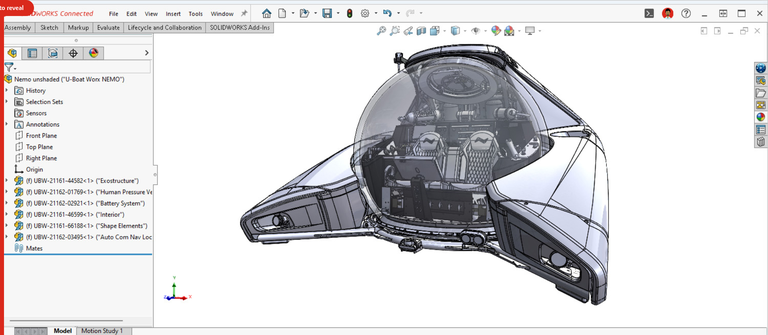
Concretely: a team designing a bracket, enclosure, or mechanism that needs assemblies, revisions tied to design intent, and drawings ready for manufacturing will align better with SOLIDWORKS. When you change a hole size or wall thickness late in the process, parametric history and associative drawings update downstream instead of forcing a manual redraw. That is the core reason product and mechanical teams standardize on it.
AutoCAD can model in 3D, but it is not architected around multi-part assemblies or design-intent-driven revisions, which is why it scores lower on those rows above.
SOLIDWORKS vs AutoCAD for Architecture and 2D Drafting
For 2D drafting, permit sets, layouts, and DWG documentation, AutoCAD is the stronger fit. It is explicitly built around drafting, detailing, and visualization, and its collaboration model is centered on the DWG file — the native AutoCAD format and a leading CAD data-exchange standard.
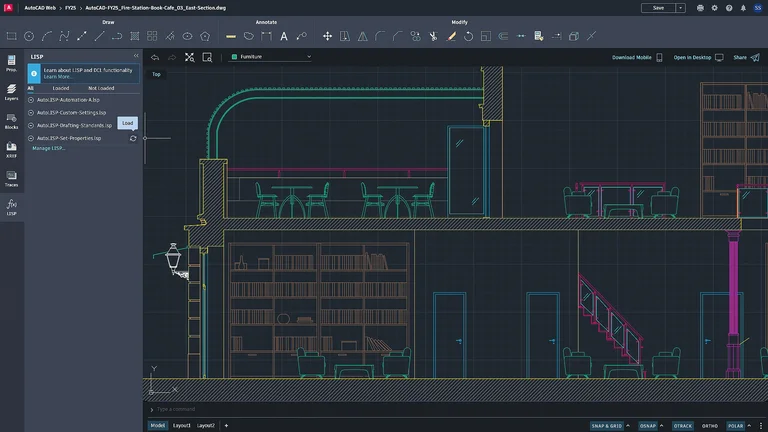
AutoCAD also ships with seven specialized toolsets — Architecture, Electrical, MEP, Map 3D, Mechanical, Plant 3D, and Raster Design — that add discipline-specific objects and automation on top of the base drafting engine. Autodesk cites an average 63% productivity gain across seven studies for work done with a specialized toolset versus basic AutoCAD, with individual studies reporting gains such as 60% for Architecture and 95% for Electrical. Treat those figures as useful illustration rather than proof: they are vendor-commissioned, and real results vary by workflow and user experience.
A small architecture-adjacent team producing layouts, annotations, revisions, and external DWG sharing will usually find AutoCAD more aligned, because the product, its toolsets, and its web/mobile access are all organized around DWG documentation.
Can AutoCAD Run on Mac? Platform and Device Support Compared
AutoCAD runs on both Windows and macOS, and every subscription includes AutoCAD on the web and mobile. That makes it the cleaner default for Mac users and for anyone who needs to open a drawing from a browser on a borrowed machine.
Mainline SOLIDWORKS desktop clients are Windows-only (Windows 10/11 64-bit per the system requirements). Dassault does offer browser-based options — xDesign for Students works on Chromebooks, Macs, tablets, and Windows, and there are browser-based maker and cloud offerings — but the full desktop product is not a native Mac application.
| Access need | AutoCAD | SOLIDWORKS |
|---|---|---|
| Native Windows desktop | Yes | Yes |
| Native macOS desktop | Yes | No (use xDesign in-browser) |
| Web / in-browser editing | Included | Via xDesign variants |
| Mobile access | Included | Limited |
If Mac-native desktop support or cross-device browser editing is a hard requirement, AutoCAD has the simpler answer.
SOLIDWORKS vs AutoCAD Pricing
Both vendors now publish US commercial pricing, making this comparison more concrete than older "contact vendor" pages. The figures below come from each vendor's official pricing page, but subscription prices and promotions can change.
| Access path | AutoCAD | SOLIDWORKS |
|---|---|---|
| Commercial | Monthly / annual / 3-year options; $2,095/yr and $260/mo per Autodesk | Standard $2,820/yr, Professional $3,456/yr, Premium $4,716/yr per SOLIDWORKS pricing |
| Free trial | 15 days | — |
| Student | Free 1-year education plan, renewable while eligible | Standard for Students free; Premium for Students $60/yr |
| Hobbyist / maker | AutoCAD LT for 2D | SOLIDWORKS for Makers $48/yr or $15/mo |
In the commercial tiers reviewed here, SOLIDWORKS is usually the more expensive commitment. Pricing is also the highest-risk field to get wrong in this topic, so re-verify live figures before you commit. If budget is the deciding factor, it's also worth weighing free and open-source CAD tools that cover a surprising amount of both 2D drafting and parametric 3D work.
AutoCAD vs SOLIDWORKS for Beginners, Students, and 3D Printing
Here is the honest nuance most comparisons skip: if your real question is "what should I learn first for home 3D printing," the AutoCAD-vs-SOLIDWORKS fork may not be the right one at all.
Autodesk's own beginner guidance points 2D beginners toward AutoCAD LT, beginner-friendly 3D users toward Fusion, and absolute beginners toward Tinkercad — not toward AutoCAD as a first 3D tool. SOLIDWORKS answers the hobbyist market with its Makers tier ($48/yr or $15/mo) for personal, non-commercial use, which supports STL export but applies file watermarking and a project-revenue cap under $2,000/year.
So for a first-time home maker on a Mac with a 3D printer, a brand-first comparison is the wrong starting point. If you also need drafting, AutoCAD earns a look; if you want serious parametric modeling, SOLIDWORKS' browser, student, and Makers paths are more relevant than the full desktop product. But absolute beginners often start faster with the simpler tools Autodesk itself names. For a printing-specific walkthrough, see our guide to the best CAD software for 3D printing.
Can AutoCAD and SOLIDWORKS Exchange Files?
Yes, and the ecosystems are less isolated than "pick one" framing suggests. Autodesk support indicates AutoCAD can import SOLIDWORKS files, and SOLIDWORKS help shows that DXF and DWG files can be imported into SOLIDWORKS as drawings or sketches. Both ecosystems also support STL export — AutoCAD through its EXPORT or STLOUT commands and SOLIDWORKS through its STL export options — which matters for prototyping and 3D printing.
A realistic cross-team workflow might model a part in SOLIDWORKS, export a neutral or drawing format, and continue documentation or collaboration in a DWG-driven environment. Import works; it does not guarantee full downstream editing fidelity, so plan handoffs around what each tool consumes cleanly.
Which Should You Choose? A Simple Decision Tree
Start with your main deliverable:
- Drawing set, floor plan, layout, or DWG documentation → choose AutoCAD.
- A part, mechanism, or assembly that will be revised dimensionally over time → choose SOLIDWORKS.
- Mac-native desktop support or in-browser editing across devices → AutoCAD is the cleaner default.
- Home maker or hobbyist focused on 3D printing more than formal drafting → SOLIDWORKS for Makers exists, but Autodesk's own guidance points many beginners to Fusion or Tinkercad first.
When both a 2D-documentation row and a 3D-assembly row describe real parts of your work, many teams end up running both tools and moving files between them rather than forcing everything into one.
Frequently Asked Questions
Which is better overall, SOLIDWORKS or AutoCAD?
Neither is better in every case. AutoCAD is usually better for DWG-heavy 2D drafting and documentation, while SOLIDWORKS is usually better for parametric 3D parts, assemblies, and product development.
Is AutoCAD only for 2D?
No. Autodesk describes AutoCAD as software for precise 2D and 3D drafting, design, and modeling. Its clearest strengths remain in drafting, documentation, and toolset-driven workflows, but it is not limited to 2D.
Is SOLIDWORKS only for mechanical engineers?
No, but it is especially aligned with mechanical and product design because it emphasizes parametric 3D modeling, parts, assemblies, documentation, simulation, and manufacturing-oriented workflows.
Can AutoCAD run on Mac?
Yes. Autodesk states that AutoCAD runs on both Windows and macOS, and its subscription also includes web and mobile access.
Can SOLIDWORKS run on Mac?
Mainline SOLIDWORKS client products are Windows-only, but SOLIDWORKS offers browser-based options such as xDesign for Students, plus some maker and cloud offerings that work on Macs and other devices.
Which is better for 3D printing?
For serious parametric printable-part design, SOLIDWORKS is generally the more natural fit, and it supports STL export. AutoCAD can also export STL, but Autodesk does not position it as the easiest beginner 3D-printing entry point.
Can AutoCAD open SOLIDWORKS files?
Yes. Autodesk support indicates AutoCAD can import SOLIDWORKS files via its import workflow.
Can SOLIDWORKS open DWG files?
Yes. SOLIDWORKS help states that DXF and DWG files can be imported into SOLIDWORKS as drawings or sketches.
Is SOLIDWORKS more expensive than AutoCAD?
Usually yes in the commercial tiers reviewed here. SOLIDWORKS publicly lists commercial tiers starting at $2,820/year, while Autodesk lists AutoCAD at $2,095/year. Re-verify both vendors' live pricing before deciding.
What is the cheapest way to start with SOLIDWORKS?
For hobbyists, SOLIDWORKS for Makers is the lowest-cost official path at $48/year or $15/month, with non-commercial restrictions, file watermarking, and a project-revenue limit. Students can access a free Standard for Students package.